Nail Salon Phone System: What You Actually Need in 2026
A nail salon phone system isn't about buying a new handset. Your line already rings. The problem is that nobody can pick up while a fill, a gel, or an acrylic is on the nail. You can keep your current line, rent a per-user VoIP plan, or forward the calls you miss so they still get booked.
Contents · 11 sections
- What this search is selling
- What the system has to do
- Three ways to cover the line
- Keep the line you already pay for
- A VoIP phone system, billed per person
- Keep your number and forward the calls you miss
- Which option fits the shop
- Forwarding checklist
- What to ask any vendor
- Bukkii Calendar is the book the call lands on
- Questions salon owners ask
This guide is for the owner of a US nail salon. You're in the middle of a gel fill, both hands in product, when the number on Google rings. If you pick up, the client in the chair waits. If you let it ring, many callers skip voicemail and try the next shop. The person who would answer is the one doing the service, and another desk phone still needs someone free to pick it up. For calls that come in mid-set, see the phone during a nail service. For calls after close, see after-hours nail salon calls.
What this search is selling
People search for "nail salon phone system," "phone system for nail salon," "salon phone system," and "best phone system for salons." On October 8, 2026, the results were mostly roundups of Ooma Office, Nextiva, Dialpad, RingCentral RingEX, and Zoom Phone. These are office phone systems, usually billed as a monthly fee per user. A nail floor needs something different: the appointment written in the book while the brush stays on the nail.
When someone does pick up, what to say is covered in the nail salon phone script. The message callers hear at the beep is covered in nail salon voicemail. A text sent after the caller has already hung up is missed call text back, and that text only helps if they reply.
What the system has to do
- Understand the actual service. Gel, dip, acrylic, a fill, a pedicure. A fill and a full set don't take the same amount of time.
- Book the tech the caller asked for. Tina on Saturday only works if Tina's column is open and Tina does that service.
- Keep the number clients already dial. It's on Google, on the window, and on the card in their wallet.
- Answer while your hands are busy, including after you lock up.
If someone can still grab the phone between clients, you may not need a new system. If every tech is in the middle of a set, something else has to do the booking.
Three ways to cover the line
- Keep your current line or landline.
- Replace it with a VoIP phone system, usually billed as a monthly fee per user.
- Keep your number, and forward unanswered and after-hours calls to an AI receptionist that books into the calendar.
Keep the line you already pay for
Option one is the landline, cell, or line the shop already has. You keep the number, and whoever is free picks up. That works for a solo tech with gaps between clients, or for two or three techs who take turns at the desk. A newer handset won't pause a fill, though. If the phone sits in a drawer, the line still rings out, and many callers won't leave a voicemail. The second way in is Bukkii Calendar, covered below. Calendar does not answer the phone.
A VoIP phone system, billed per person
Option two is what the roundups are selling. Ooma Office, Nextiva, Dialpad, RingCentral RingEX, and Zoom Phone replace the old line with desk phones or an app, plus extensions, voicemail, and often texting. The usual bill is monthly, per user, so one owner and four techs often means five fees. Some plans require an annual term for the lowest price, while others, like Ooma Office, say no contract is needed. This page does not copy their dollar amounts. Check the per-user price on each vendor's own pricing page on the day you decide.
Buy VoIP for the hardware: a handset at the front, one at a station, transfers to a free tech, or a second location. On its own, an extension still needs a person to answer it, so VoIP alone is a weak purchase when the pitch is "so you stop missing calls during a set." Some of these vendors, including RingCentral and Ooma, sell AI receptionist or answering add-ons on top of the per-user plan. Check that add-on's price and what it can actually book before you count on it. RingCentral's version is covered in RingCentral AI receptionist.
Keep your number and forward the calls you miss
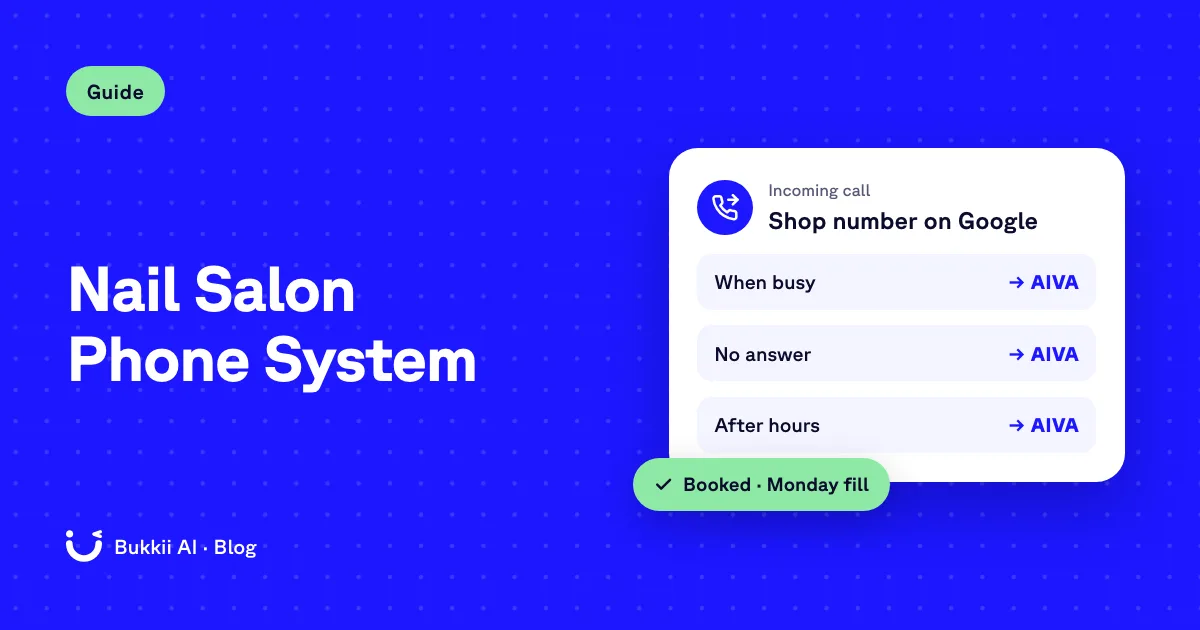
Option three leaves your public line exactly where it is. Clients keep dialing the number on Google. You forward unanswered calls, and calls that come in after you lock the door, to a dedicated number that answers and books. The three forwarding rules on the carrier you already have — busy, no answer, and after hours — are explained in call forwarding for a nail salon.
AIVA is that AI receptionist. You don't port the salon number to Bukkii. The setup is simply forwarding your existing line to the AIVA number. If a vendor's only option is "move your number to us," that's a different product.
The $200 one-time payment covers the dedicated phone number, AIVA training on your menu and policies, calendar setup, and number forwarding. No monthly fee. No contract. No free trial. Unlimited staff. She answers 24/7 and can create, reschedule, and cancel appointments on Bukkii Calendar, route the caller to the right staff member, and filter spam. Pricing also lists call transfer to a human, but a transfer doesn't help when your hands are in a wet set. She answers in a natural English voice. The product pages do not claim Vietnamese or Spanish for callers. If you need those languages on the call, get it in writing from the vendor. For AIVA, the answer is no. See English voice for Vietnamese-owned salons.
This is not an automatic text to every missed caller. Included usage is 100 voice minutes and 1,500 SMS for the appointment text and reminders, then $0.35/min and $0.035 per SMS. Packs never expire. Get AIVA — $200. Live in 5 minutes. Hear her at (215) 791-6766.
Which option fits the shop
If two rows apply to you, start with the smaller purchase. Forwarding covers missed calls. VoIP covers extensions and desk phones.
| Shop | What to set up |
|---|---|
| Solo, or two or three techs, and someone can still pick up between clients | Keep your current line. Add a booking website for callers who won't wait on hold. |
| You want a handset or app for each person, plus extensions and transfers | A VoIP phone system. Check the per-user monthly fee and the contract terms on the vendor's page. |
| The line rings during a set or after close, and you want the appointment written in the book | Keep your number. Forward unanswered and after-hours calls so they book into the calendar. |
| More than three people take appointments, or you want Book Online on Google | Bukkii Calendar at $20/month. Unlimited staff and customers, plus Reserve with Google. That's the book, not the phone. |
This table does not list VoIP dollar amounts. Check each vendor's public pricing page before you budget.
Forwarding checklist
Forwarding is the supported setup. If the test booking doesn't show up on the calendar, stop and fix it before going live.
- Leave the public number alone. Google, the window, and your cards keep the number clients already dial.
- Forward to the dedicated number that comes with the $200 payment. You don't need to print that number on the window.
- Set up forwarding for unanswered calls, and for after hours if that's a separate rule, on your carrier or on the phone box at the shop.
- Train the menu: service names, your prices, durations, hours, and the policies you want callers to hear.
- Finish calendar setup, which is included in the same $200 payment. Everyone who takes appointments needs a column.
- Call your Google number from a cell phone. Let it ring and confirm it reaches AIVA. Book a test fill, cancel it, and check the calendar.
- Tell the team the ring count. If someone grabs the handset on the first ring, the forward never kicks in. Set the ring count on your carrier's settings screen.
What to ask any vendor
Ask these questions before you pay. A demo of the greeting is not an answer.
- Per-user fees. Is it one price for the shop, or a monthly fee for every person, extension, or app?
- Contracts. How many months, what it costs to cancel, and whether hardware has to be returned.
- SMS. How many texts are included, and what they cost after that. AIVA includes 1,500 SMS, then $0.035 each, for texts after a booking. It does not text every missed caller.
- Booking. Does the call create, reschedule, and cancel appointments on a staff calendar, or just take a message?
- Your number. Do you keep it and forward, or move it to their carrier? Bukkii's setup is forwarding.
- Language. If you need Vietnamese or Spanish on the call, get it in writing. AIVA answers in English.
Bukkii Calendar is the book the call lands on
The phone and the book are separate products. Bukkii Calendar is where your appointments live, and AIVA books into it. A caller who won't stay on the phone can use the booking website instead, which is included on the free plan. See online booking.
Calendar is free for up to 3 staff. Count the people who take appointments. With three or fewer, the free plan covers the calendar and the booking website. Reserve with Google is not on the free plan, and email reminders come with the $20 plan.
$20/month unlocks unlimited staff and customers, plus Reserve with Google. That Book Online button on Google Maps is Reserve with Google. If you have more than three people, or you want the button, $20/month is the plan that fits your team.
Calendar does not answer the phone and includes no voice minutes. A booking page still loses the caller who won't tap a link, and an unanswered phone still loses the caller who won't hold. Start Calendar free. Both prices are listed on pricing.
Questions salon owners ask
What is a nail salon phone system supposed to do?
A nail salon phone system has to catch the call when every tech is in the middle of a service. New desk phones don't fix that on their own. The real test is whether an unanswered call still ends up as a booked appointment on the calendar.
Should a nail salon replace its line with a VoIP phone system?
Replace the line if you want extensions, desk phones or an app for each person, and you're comfortable paying a per-user monthly fee. If the only problem is that nobody can pick up during a set, a new phone system still needs someone free to answer, unless you also pay for that vendor's AI answering add-on.
Can I keep my salon number?
Yes. Keep the number on Google and on the window, and forward unanswered and after-hours calls to a dedicated number. Moving your number to a new carrier is a different product. The setup on this site is forwarding, not porting.
How much does AIVA cost?
AIVA is $200 one-time. No monthly fee. No contract. No free trial. Unlimited staff. That payment covers a dedicated phone number, AIVA training on your menu and policies, calendar setup, and number forwarding. It includes 100 voice minutes and 1,500 SMS. After that, voice is $0.35 a minute and SMS is $0.035 each. Packs never expire.
How much is Bukkii Calendar?
Calendar is free for up to 3 staff, and the free plan includes the booking website. Reserve with Google is not on the free plan, and email reminders come with the $20 plan. $20/month unlocks unlimited staff and customers, plus Reserve with Google. Calendar does not answer the phone. AIVA books into that calendar.
Does AIVA answer callers in Vietnamese or Spanish?
No. AIVA answers in a natural English voice. The product pages do not claim a Vietnamese or Spanish caller voice. Owner pages are available in Vietnamese. If your clients need calls answered in Vietnamese or Spanish, get it in writing from any vendor before you buy.
What should I ask before I buy a salon phone system?
Ask whether the price is per user per month, whether there's a contract, what SMS costs after the included texts, and whether a call can create, reschedule, and cancel appointments on the calendar. Also ask whether you can keep your current number by forwarding.